Private voice typing for Windows
Speak... Your words appear. Your voice never leaves your PC.
Tap a key, say what you mean, tap Space, and clean text lands wherever your cursor is: your email, your code editor, a chat box, a doc.
- No account
- No subscription
- No cloud
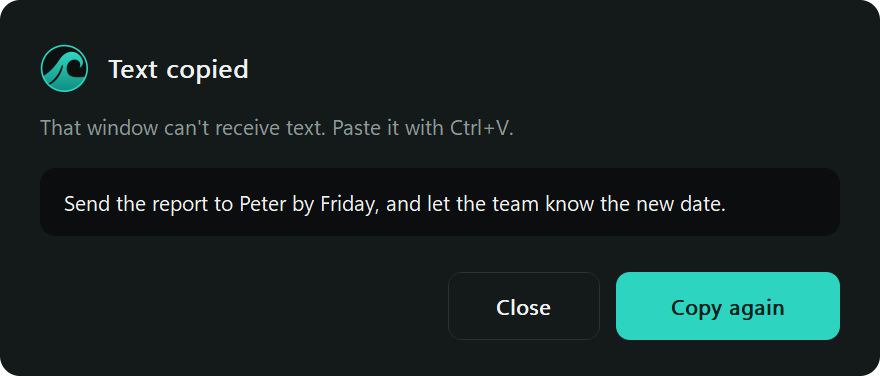
Send the report to Peter by Friday, and let the team know the new date.
CtrlShift talkSpace done
Video demo to comeA short screen recording: tap, talk, tap Space, and the words land.
How it works
Three taps. No new window.
Ctrl+Shift
Tap and talk.
A wave rises along the bottom of your screen and moves with your voice, and your words appear above it as you speak, so you always know it's working.

A calm swell while you're quiet. Breaking surf while you speak. Space
Tap Space when you're done.
A few seconds later, you're ready to go.

Picture to comeThe caption finishing above the wave |
Keep working.
The text appears at your cursor, tidied up and correctly spaced. You never left the app you were in.
Picture to comeDictated text landing in an email or doc
Why Whispr Waves
Most people speak faster than they type. Most voice tools charge a monthly fee for that speed and send your words to someone else's servers to deliver it.
| Whispr Waves | Typical cloud dictation | |
|---|---|---|
| Where your voice goes | Nowhere. It stays on your PC | To the vendor's servers |
| Price | A small one-time fee | Usually a subscription |
| Account | None | Required |
| Works offline | Yes, after a one-time setup download | No |
| Audio storage | Memory only, never saved to disk | Depends on the vendor |
| Telemetry | None | Common |
| Graphics card | Not needed | Not applicable |
| Admin rights | Not needed | Varies |
Dictation that keeps up. Built for real life.
- See your words as you speak. A live caption shows your text within a few seconds, with a timer, and warns you if your microphone goes quiet.
- Works in most Windows apps. If you can click into a text box, you can usually dictate into it. Some apps block pasting, and then a panel holds your words.
- Talk your way. Tap to start and tap Space to stop, switch to hold-to-talk, or turn on hands-free mode and just speak.
- Tidies as it goes. Removes "um" and "uh", fixes self-corrections ("scratch that"), and handles spacing and capitals from the text around your cursor.
- Learns your words. Teach it the names and terms it gets wrong, and it gets them right from then on.
- Snippets. Say a short phrase, get your full email signature or address.
- Voice commands. Say "new line", "new paragraph", "undo", or "select all". Off by default, one setting to enable.
- English and Spanish. Separate language packs for fillers and commands, usable together.
- Doesn't get in your way. The wave never takes focus and clicks pass straight through it.
- Long dictation is safe. Your words are saved piece by piece as you talk, up to 10 minutes at a time.
- Takes care of your clipboard. Whatever you had copied comes back after pasting, even images and files.
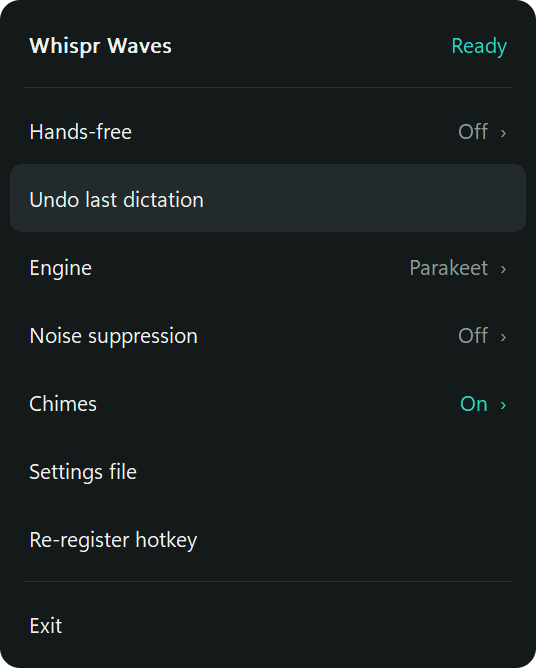
- Undo in one click from the tray menu.
- Bluetooth friendly. Pre-roll in hands-free mode keeps your first word from getting cut off.
Privacy you can check
Turn off your internet and it keeps working.
Privacy here isn't a policy that can change. It's how the software is built.
No networking in the app.
The application package imports no HTTP or socket library. Setup downloads the model once and checks it against pinned hashes.
Nothing saved by default.
Audio and text live in memory. Saving audio or logging dictated text is rejected by the app's own settings validation.
Logs hold metadata only.
Timings and status, never your words, clipboard contents, or window titles.
Your words are never run as commands.
Voice commands are a fixed list.
No keylogger behavior.
There's no global keyboard hook. Only your configured keys are watched.
Password fields stay private.
Context reading skips them, and you can block any app from automatic pasting.
Get Whispr Waves
Price to come
A small one-time fee, with no subscription.
- No account
- No limit on how much you dictate
- English and Spanish
- Works offline after a one-time setup download
Checkout opening soon
Ask us about Whispr WavesBy buying you agree to the licence. See the refund policy and check the requirements before you buy.
You'll need
- 64-bit Windows 11
- About 1 GB of free disk space
- About 1 GB of free memory
- A working microphone
- An internet connection once during setup
You don't need Python, Git, or admin rights.
Getting started
- Download WhisprWavesSetup.exe (30 MB).
- Open it and follow the steps. It downloads the speech model (about 670 MB) and checks every file. If your connection drops, run Setup again and it picks up where it left off.
- Tap Ctrl + Shift and talk.
Early release. Whispr Waves is in active development, so expect rough edges and tell us what you find. Windows may show a SmartScreen warning because early releases aren't code signed yet. Choose More info, then Run anyway.
FAQ
What does it cost?
A small one-time fee, with no subscription. There's no account to create, and no limit on how much you dictate.
Does it work without internet?
Yes. Setup downloads the speech model once, and after that it never connects to anything.
Will it work on my laptop?
It's built for ordinary laptop CPUs, with no graphics card needed. Expect it to use about 800 MB of memory while running and about 800 MB of disk. It transcribed speech about twice as fast as real time on a laptop Intel Core i7-1355U. Your results will vary with your hardware.
Can I use it on a work computer?
It needs no admin rights and installs no drivers or keyboard hooks. Check your organization's software policy first. If your network blocks the download, get the model elsewhere and choose I already have it in a folder during setup.
Which microphone should I use?
Your laptop's built-in mic or a wired headset will give the best accuracy. Bluetooth headsets work, but their microphones are lower quality.
Is there a Mac or mobile version?
Windows comes first. An Android app is on the roadmap.